AWS CloudTrail Logs Ingestion in Splunk
Build a reliable CloudTrail ingestion pipeline for Splunk with AWS services like S3, SNS and SQS. Understand each component and how Splunk processes logs end-to-end.
Overview
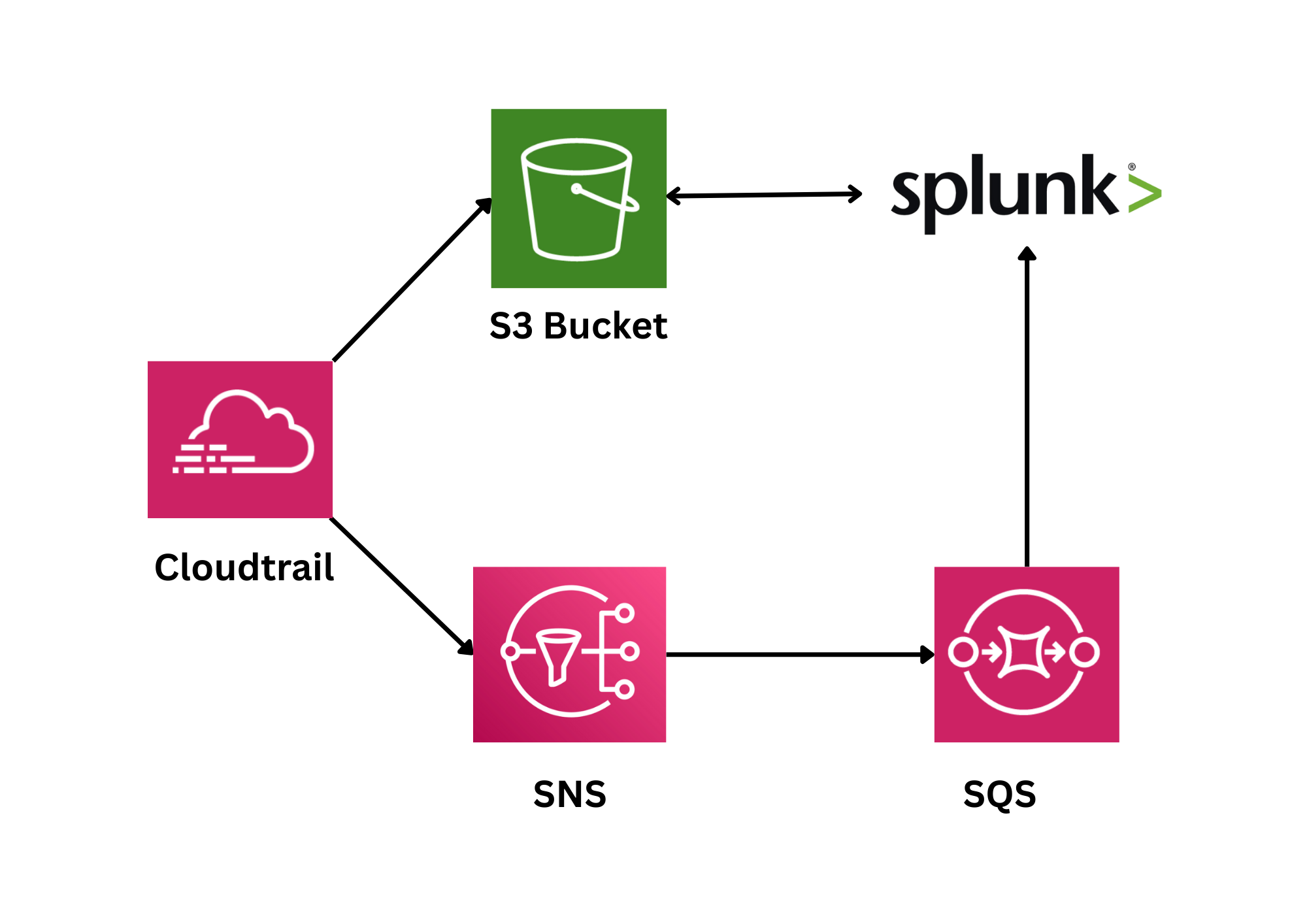
This guide provides a complete walkthrough for forwarding AWS CloudTrail logs to Splunk using the AWS-recommended architecture. By following this documentation, you'll implement a production-ready logging pipeline that ensures reliable, scalable log ingestion.
| Component | Purpose |
|---|---|
| CloudTrail | Records AWS API calls and management events |
| S3 Bucket | Stores CloudTrail log files (.json.gz format) |
| SNS Topic | Publishes notifications when new logs arrive |
| SQS Queue | Queues notifications for Splunk to poll |
| DLQ | Captures messages that fail processing repeatedly |
| IAM User | Provides Splunk with AWS API credentials |
| Splunk TA-AWS | Polls SQS, downloads logs, and indexes events |
Why This Architecture?
This design follows AWS best practices for several reasons:
- Reliability: SNS provides durable message delivery with retry logic
- Scalability: SQS can handle high message volumes without data loss
- Decoupling: Components are loosely coupled, preventing single points of failure
- Visibility: DLQ captures failed messages for analysis
- Security: IAM policies enforce least-privilege access
What You'll Learn
-
CloudTrail to Splunk Ingestion Overview
A complete walkthrough of how CloudTrail logs move through SNS and SQS before reaching Splunk. Understand the full AWS pipeline and how Splunk ingests logs reliably from S3.
-
End-to-End Log Pipeline Implementation
Learn how to configure CloudTrail, SNS, SQS, IAM, and Splunk to build a production-ready ingestion setup. Each step is explained clearly with real configurations and best practices.
-
Architecture and Configuration Breakdown
Explore how each AWS service fits into the CloudTrail log delivery workflow toward Splunk. Get clarity on message flow, error handling, security, and Splunk integration.
-
Reliable CloudTrail Log Forwarding Setup
See how SNS, SQS, and S3 create a fault-tolerant pipeline for Splunk log ingestion. Learn the exact configuration Splunk uses to poll SQS and download CloudTrail files.
Lab Environment
Experience hands-on learning with our carefully designed lab environment that mirrors real-world scenarios.
- Real-world tools and interfaces
- Step-by-step guided instructions
- Interactive lab environment
- Hands-on practice with live systems
About Trainer

Aman Gupta
Aman Gupta is an emerging voice in automation-driven cybersecurity, combining strong engineering skills with a passion for knowledge sharing. He has worked on advanced projects spanning security monitoring, intelligent alerting, process automation, and AI-powered decision systems. With experience bridging software engineering and modern DevSecOps practices, Aman focuses on simplifying complex technologies into practical, real-world applications.
Related Projects
Apache Server Log Analysis using Splunk
Detecting Brute Force, SQL Injection, XSS, and Suspicious Web Activity from Apache Access Logs with Splunk SIEM
Practical AWS Cloud Security Posture Assessment Using Scout Suite
Identify real-world AWS attack surfaces through visual security posture analysis.
Wazuh + n8n + Anyrun: Automated Malware Analysis
Automate malware analysis by sending Wazuh-detected suspicious files into ANY.RUN, retrieving detailed reports and IOCs, and integrating results back into your SOC workflow.