AWS CloudWatch Logs Ingestion in Splunk
Building a Secure & Serverless CloudWatch-to-Splunk Pipeline Using AWS Native Services
Overview
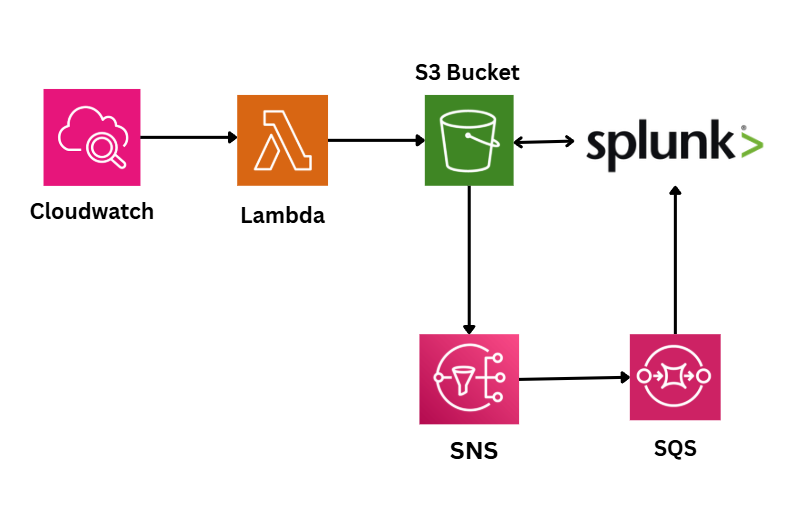
This project demonstrates a complete, production-grade log forwarding pipeline that sends AWS CloudWatch Logs to Splunk using a fully serverless and scalable architecture.
Here’s how the pipeline works:
CloudWatch Logs trigger a Lambda function using a subscription filter.
Lambda transforms and writes processed log batches into Amazon S3 as compressed .json.gz files.
Amazon S3 detects new log files and sends notifications to SNS.
SNS delivers these notifications to SQS, which acts as a durable message queue.
Splunk Add-on for AWS polls SQS, validates SNS messages, fetches log files from S3, decodes CloudWatch events, and indexes them.
This architecture is used in real production environments because it is cost-efficient, scalable, fault-tolerant, and avoids CloudWatch API rate limits.
What You'll Learn
-
CloudWatch Log Streaming
Learn how subscription filters push logs in real-time to Lambda.
-
Lambda Log Transformation
Understand how logs are decoded, compressed, and written into S3.
-
S3-Based Log Delivery
See how structured log files are stored for Splunk indexing.
-
vent-Driven Notifications (SNS → SQS)
Learn how Splunk gets notified instantly when new logs arrive.
-
Splunk SQS-Based S3 Ingestion
Discover how Splunk validates messages and pulls logs from S3 reliably.
Prerequisites
-
Basic AWS and Splunk knowledge required to follow and implement the pipeline
AWS account with access to S3, Lambda, CloudWatch, SNS, SQS -
Basic AWS and Splunk knowledge required to follow and implement the pipeline
Splunk Enterprise/Cloud with Splunk Add-on for AWS -
Basic AWS and Splunk knowledge required to follow and implement the pipeline
IAM user credentials for Splunk ingestion -
Basic AWS and Splunk knowledge required to follow and implement the pipeline
Basic understanding of Python (optional, for Lambda updates) -
Basic AWS and Splunk knowledge required to follow and implement the pipeline
Familiarity with navigating AWS Console
Lab Environment
Experience hands-on learning with our carefully designed lab environment that mirrors real-world scenarios.
- Real-world tools and interfaces
- Step-by-step guided instructions
- Interactive lab environment
- Hands-on practice with live systems
About Trainer

Aman Gupta
Aman Gupta is an emerging voice in automation-driven cybersecurity, combining strong engineering skills with a passion for knowledge sharing. He has worked on advanced projects spanning security monitoring, intelligent alerting, process automation, and AI-powered decision systems. With experience bridging software engineering and modern DevSecOps practices, Aman focuses on simplifying complex technologies into practical, real-world applications.
Related Projects
Apache Server Log Analysis using Splunk
Detecting Brute Force, SQL Injection, XSS, and Suspicious Web Activity from Apache Access Logs with Splunk SIEM
Practical AWS Cloud Security Posture Assessment Using Scout Suite
Identify real-world AWS attack surfaces through visual security posture analysis.
Wazuh + n8n + Anyrun: Automated Malware Analysis
Automate malware analysis by sending Wazuh-detected suspicious files into ANY.RUN, retrieving detailed reports and IOCs, and integrating results back into your SOC workflow.